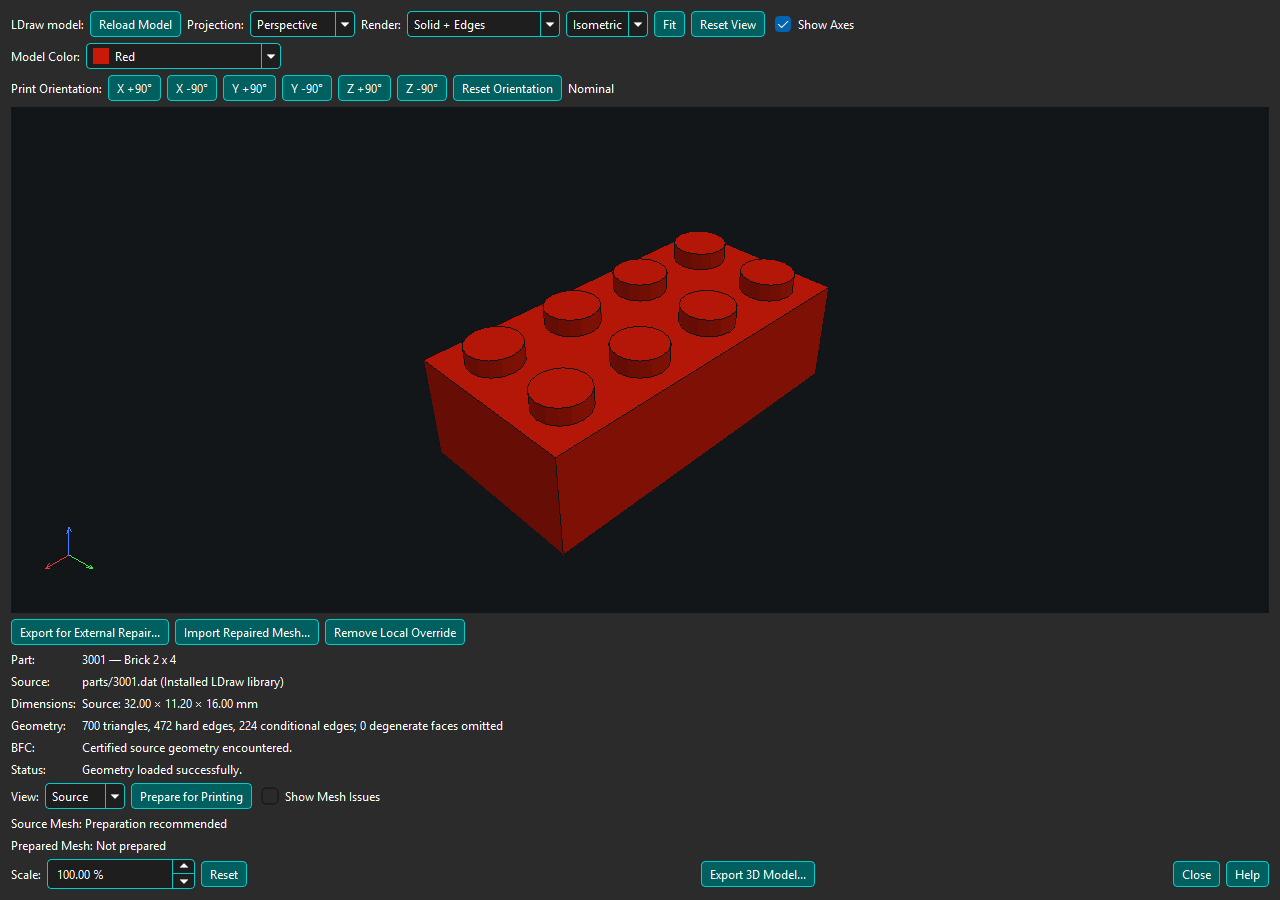
Try native Prepare for Printing first. If it cannot safely prove printable geometry, use Export for External Repair..., repair in your preferred external tool, and choose Import Repaired Mesh.... BrickSuite validates the result before offering a Strictly Validated Local Override or, only for eligible unresolved source correspondence, explicit user-reviewed nominal acceptance. Both accepted routes use normal nominal Prepared Mesh export. External repair does not establish semantic fit ownership; Experimental Auto Fit is a separate, warned attempt and can safely reject the repair.
For a catalog Part whose native Prepare for Printing fails, choose Export for External Repair.... BrickSuite exports all loaded Source triangles as an unvalidated 3MF in physical millimeters, at nominal 100% scale and the original orientation, independent of viewer Scale and Print Orientation. Repair that file in your preferred mesh tool. Keep its scale and orientation; export one repaired solid as a millimeter 3MF or STL. An older Studio-scaled export is not interchangeable with this file.
Import Repaired Mesh... accepts 3MF and binary or ASCII STL. STL interpreted as millimeters means each coordinate is used directly as a millimeter value; STL carries no authoritative unit metadata. BrickSuite never automatically rescales it. A material size mismatch is rejected against the authoritative Source. Malformed/truncated STL records reject the entire file; invalid triangles are never silently discarded. ASCII STL must contain one complete solid block. Both formats use the same geometry acceptance rules and preserve a previous valid override on rejection.
For a tool without 3MF import, use Export 3D Model... with Source Mesh and STL. First set viewer Scale to 100% and reset Print Orientation, since this ordinary export uses both settings. In your preferred repair tool, keep raw numeric coordinates in millimeters, use import/export Scale 1 without automatic unit scaling, and preserve the original orientation. Repair without changing intended dimensions, then export only the repaired object. Verify dimensions before and after repair; do not compensate for a mismatch by guessing a scale factor.
Choose Import Repaired Mesh.... BrickSuite requires one closed, consistently outward-oriented manifold with no degenerate or duplicate faces, non-manifold edges/vertices, or detected self-intersections. It compares bounds and sampled surface distances in both directions against the authoritative Source. Slicer placement translation is removed, but scale and rotation are never inferred or fitted. Validation has fixed tolerances and workload limits; rejection leaves any existing valid override intact. These checks reject gross alteration but do not certify LEGO fit. Review the bore, walls, openings, arms, and dimensions in your repair tool and slicer.
Unrecognized application metadata, including unresolved vendor metadata namespaces, does not itself invalidate readable mesh geometry. File/container import failed means the file could not be extracted safely. Mesh loaded but override validation failed means extraction succeeded and BrickSuite's geometry checks rejected the mesh; the message lists topology findings or the bounds/fidelity failure. Checks not reached after an earlier rejection are identified as not run. A repair tool's success message does not bypass these checks. After rejection, Show Mesh Issues still displays the authoritative Source, not the rejected mesh. Nominal Prepared Mesh requires an accepted mesh; a rejected import leaves an existing valid override available. ManufacturingMesh additionally requires proven fit ownership.
When an import contains two independently valid closed solids with detected surface contact/intersection, BrickSuite may attempt one closed-component union. It never unions merely nearby or disconnected solids, and never attempts this when either component is invalid. The operation is isolated with a 10-second deadline, 512 MiB worker memory cap, and 2,000 input-triangle limit. The union must pass the complete topology, bounds, and source-fidelity checks before replacing an override. Successful normalization is recorded in the local override metadata. Generated union surfaces remain nominal with no inferred fit ownership.
An accepted mesh shows Prepared Mesh: Ready — Strictly Validated Local Override (Nominal). Use the View selector to compare authoritative Source with the local override. Export 3D Model... exports the override through the normal nominal Prepared Mesh workflow as 3MF, STL, or OBJ. Auto Fit and profile ManufacturingMesh are unavailable because repaired triangles have no proven fit ownership. Ordinary export still applies the selected viewer Scale and Print Orientation.
Overrides are stored locally in BrickSuite's application-data directory, bound to the internal Part identity, resolved LDraw identity, Source geometry/reference fingerprint, and repaired-mesh fingerprint. Reopening revalidates the stored mesh. Changed Source makes an override stale and unusable; export and repair the new Source. Use Import Repaired Mesh... again to replace an override, or Remove Local Override to return to native preparation. Source files, catalog records, aliases, and Part mappings are unchanged. Ad-hoc external LDraw viewers cannot install catalog overrides.
In Export 3D Model, nominal Prepared Mesh shows Fit Profile: Not applicable — nominal PreparedMesh export. Available Verified Fit Profiles are listed separately for local overrides: availability does not mean a profile changes nominal geometry. Source Mesh likewise does not apply a profile. The Experimental Auto Fit warning lets you select an available compatible Verified profile even when no source correction maps to the repair. Diagnostics distinguish the selected profile, recognized source semantics, mapped repaired features, correction entries considered, corrections applied, and unmapped features. Zero mappings does not mean the selected profile is missing.
A separate Reviewable — Source exposure correspondence unresolved result can appear when only reverse correspondence to an open/overlapping Source fails. This is not automatic acceptance. Topology, orientation, fixed bounds tolerance, and repaired exterior distance must still pass. Unmatched source samples must be inside the repaired material, with no demonstrated outside or exposed loss. Known fit interfaces cannot be waived. Blocked source rays are evidence of ambiguity, not a source-exposure certificate.
Inspect the repaired geometry in your repair tool, then choose Accept as Nominal Local Override.... The warning requires explicit confirmation (Cancel is the default). BrickSuite revalidates the same source and repaired-mesh fingerprints before saving. The status becomes Ready — User-Accepted Local Override (Nominal), never automatically source-certified. Acceptance and validation versions are stored with the fingerprints; stale geometry requires review again. Nominal 3MF, STL, and OBJ exports identify this provenance. Source and catalog data remain unchanged.
Experimental Auto Fit... requires a new warning on each attempt. BrickSuite reads existing managed Verified Fit Profiles and inspects authoritative source semantics. It never creates calibration evidence, changes profiles, or guesses ownership of repaired triangles. The current ownership gate cannot establish a safe mapping onto repaired surfaces, so attempts fail safely with recognized-feature and correction details; the nominal override remains available. No experimental transformed output is produced by this version. Hover over the result for the attempt record, including override identity, profile resolution, applied corrections, and validation status.