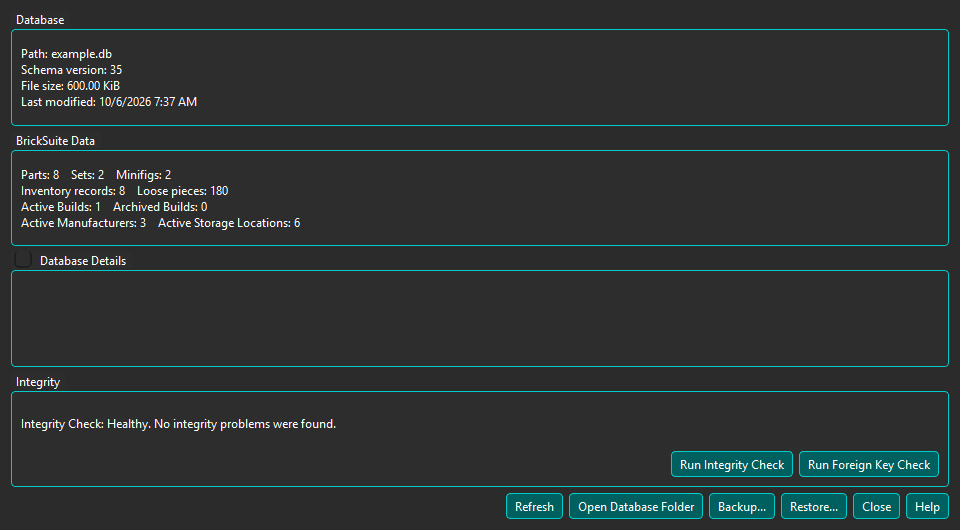
Choose Tools → Database Status & Integrity... to view the current database file, schema version, size, catalog and inventory counts, and selected SQLite details.
The result area describes the most recently completed check; run both checks separately.
Run Integrity Check asks SQLite to examine the complete database structure. Run Foreign Key Check looks for records whose required related records are missing. These read-only checks can take time on a large database; BrickSuite remains responsive while they run.
A Healthy result means the selected check found no problem.
An Integrity Check problem may indicate damage to the SQLite database structure. Avoid unnecessary database changes, review the Application Log, and preserve the current database file before experimenting. Restore a previously verified known-good backup if one is available.
A Foreign Key Check violation means a record refers to a required related record that is missing. This is a logical data-consistency problem; it does not necessarily mean that the SQLite file is physically damaged. Review the Application Log, avoid relevant data changes, preserve the current database, and consider restoring a known-good backup.
BrickSuite verifies the selected backup before replacement and creates and verifies a pre-restore safety backup. See Backup / Restore.
A backup of an unhealthy database is preservation, not repair. It may also preserve the detected problem. BrickSuite never automatically repairs detected corruption or deletes inconsistent records.
A busy or locked result normally means other database activity must finish before retrying. For a missing database, check whether the displayed application-data file was moved or removed. For an open failure, check the path and file permissions. Retry a query failure once; if it repeats, review the Application Log and Help. These outcomes are not themselves findings of database corruption.
After an integrity or foreign-key problem, choose Copy Diagnostic Summary to copy a bounded technical summary containing the application and schema versions, database and log paths, check result, and representative diagnostics. It does not copy credentials, provider configuration, inventory contents, catalog contents, or unrelated log text.
Open Database Folder opens the containing directory without opening or editing the SQLite file. The Backup and Restore buttons use the same verified workflows as the File menu. Recovery actions can also open BrickSuite's existing Application Log viewer.